 លំហសិក្សាកម្ពុជា
V1.0
លំហសិក្សាកម្ពុជា
V1.0
លំហសិក្សាកម្ពុជា
V1.0
លំហសិក្សាកម្ពុជា
V1.0
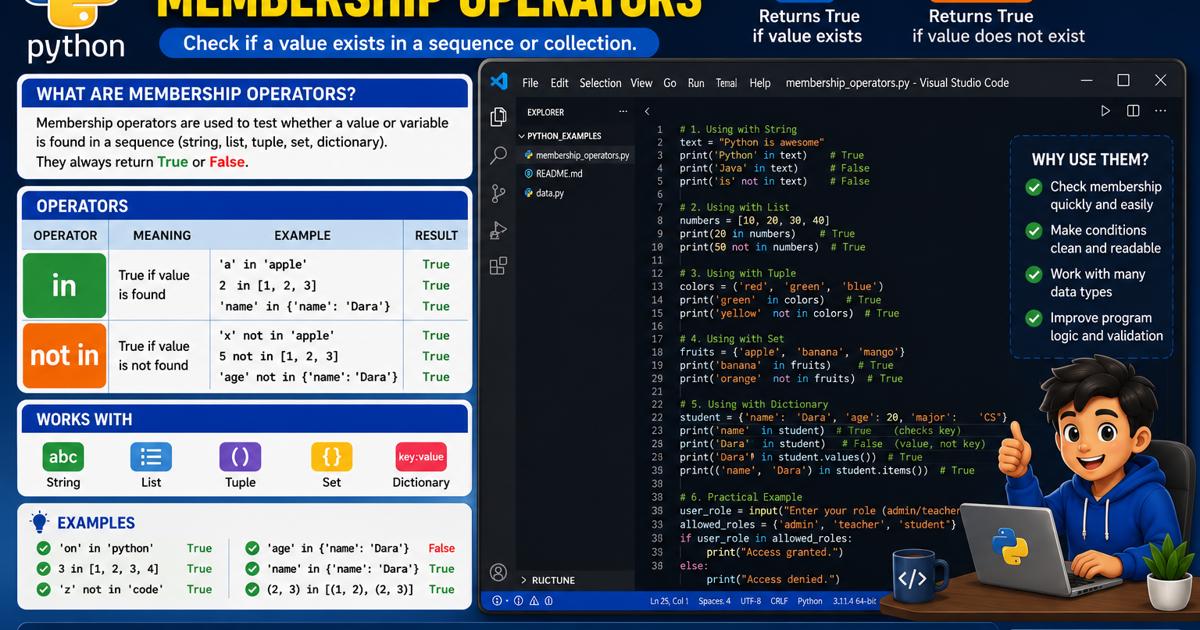


ប្រតិបត្តិករសមាជិកភាពក្នុង Python មាន in និង not in ដែលប្រើសម្រាប់ពិនិត្យថា តម្លៃ ធាតុ ឬពាក្យណាមួយមាន ឬមិនមាននៅក្នុង String, List, Tuple, Set ឬ Dictionary។ in ផ្ដល់លទ្ធផល True នៅពេលរកឃើញតម្លៃ ខណៈ not in ផ្ដល់លទ្ធផល True នៅពេលតម្លៃនោះមិនមាន។ នៅពេលប្រើជាមួយ Dictionary វាពិនិត្យលើ Key ជាមូលដ្ឋាន ហើយអាចប្រើ .values() ដើម្បីពិនិត្យតម្លៃ។ ប្រតិបត្តិករទាំងនេះត្រូវបានប្រើជាញឹកញាប់ជាមួយ if, else និងប្រតិបត្តិករតក្កវិទ្យា ដើម្បីពិនិត្យឈ្មោះ សិទ្ធិអ្នកប្រើ វគ្គសិក្សា និងទិន្នន័យផ្សេងៗក្នុងកម្មវិធី។
ក្នុងការសរសេរកម្មវិធី យើងតែងតែត្រូវពិនិត្យថា តម្លៃ ធាតុ ពាក្យ ឬទិន្នន័យណាមួយមាននៅក្នុងបណ្ដុំទិន្នន័យដែរឬទេ។ ឧទាហរណ៍ កម្មវិធីអាចពិនិត្យថា ឈ្មោះសិស្សមាននៅក្នុងបញ្ជីឈ្មោះ ពាក្យមួយមាននៅក្នុងអត្ថបទ លេខមួយមាននៅក្នុងបណ្ដុំលេខ ឬឈ្មោះអ្នកប្រើមាននៅក្នុងប្រព័ន្ធដែរឬទេ។
Python ប្រើ ប្រតិបត្តិករសមាជិកភាព (Membership Operators) ដើម្បីពិនិត្យថា តម្លៃមួយជាសមាជិក ឬមិនមែនជាសមាជិកនៃបណ្ដុំទិន្នន័យ។ ប្រតិបត្តិករសមាជិកភាពមានពីរគឺ៖
innot inលទ្ធផលនៃការពិនិត្យតែងតែជា True ឬ False។
ប្រតិបត្តិករសមាជិកភាព គឺជាប្រតិបត្តិករដែលប្រើសម្រាប់ពិនិត្យថា តម្លៃ ឬធាតុណាមួយមាន ឬមិនមាននៅក្នុងបណ្ដុំទិន្នន័យ ដូចជា៖
StringListឧទាហរណ៍៖
fruits = ["apple", "banana", "mango"]

print("banana" in fruits)
កម្មវិធីពិនិត្យថា "banana" មាននៅក្នុងបញ្ជី fruits ដែរឬទេ។ ដោយសារវាមាននៅក្នុងបញ្ជី លទ្ធផលគឺ៖
True

| ប្រតិបត្តិករ | អត្ថន័យ | ឧទាហរណ៍ | លទ្ធផល |
|---|---|---|---|
in | ពិនិត្យថាតម្លៃមានក្នុងបណ្ដុំ | "apple" in fruits | True |
not in | ពិនិត្យថាតម្លៃមិនមានក្នុងបណ្ដុំ | "orange" not in fruits | True |
inប្រតិបត្តិករ in ប្រើសម្រាប់ពិនិត្យថា តម្លៃមួយមាននៅក្នុងបណ្ដុំទិន្នន័យដែរឬទេ។
TrueFalseឧទាហរណ៍៖
numbers = [10, 20, 30, 40]

print(20 in numbers)
print(50 in numbers)
លទ្ធផល៖
True
Falsenot inប្រតិបត្តិករ not in ប្រើសម្រាប់ពិនិត្យថា តម្លៃមួយមិនមាននៅក្នុងបណ្ដុំទិន្នន័យដែរឬទេ។
TrueFalseឧទាហរណ៍៖
numbers = [10, 20, 30, 40]

print(50 not in numbers)
print(20 not in numbers)
លទ្ធផល៖
True
Falseប្រតិបត្តិករសមាជិកភាពអាចប្រើសម្រាប់ពិនិត្យថា តួអក្សរ ឬពាក្យមួយមាននៅក្នុងខ្សែអក្សរដែរឬទេ។
message = "Python programming is easy"

print("Python" in message)
print("Java" in message)
លទ្ធផល៖
True
Falseword = "Cambodia"
print("C" in word)
print("z" in word)លទ្ធផល៖
True
FalsePython គិតគូរពីភាពខុសគ្នារវាងអក្សរធំ និងអក្សរតូច។
text = "Python"

print("Python" in text)
print("python" in text)
លទ្ធផល៖
True
False
ដើម្បីមិនគិតពីអក្សរធំ និងអក្សរតូច អាចប្រើ .lower()៖
text = "Python Programming"

print("python" in text.lower())
លទ្ធផល៖
TrueList គឺជាបណ្ដុំទិន្នន័យដែលអាចរក្សាទុកធាតុច្រើន។
students = ["Dara", "Sokha", "Vanna", "Sreyneang"]

print("Sokha" in students)
print("Bopha" in students)
លទ្ធផល៖
True
Falsestudents = ["Dara", "Sokha", "Vanna", "Sreyneang"]
name = input("Enter student name: ")
if name in students:
print("The student is registered.")
else:
print("The student is not registered.")កម្មវិធីទទួលឈ្មោះពីអ្នកប្រើ ហើយពិនិត្យថា ឈ្មោះនោះមាននៅក្នុងបញ្ជី students ដែរឬទេ។
Tuple ជាបណ្ដុំទិន្នន័យដែលស្រដៀងនឹង List ប៉ុន្តែតម្លៃរបស់វាមិនអាចកែប្រែដោយផ្ទាល់បាន។
colors = ("red", "green", "blue")

print("green" in colors)
print("yellow" not in colors)
លទ្ធផល៖
True
TrueSet ជាបណ្ដុំទិន្នន័យដែលមិនអនុញ្ញាតឱ្យមានតម្លៃស្ទួន។
allowed_roles = {"admin", "teacher", "student"}

print("teacher" in allowed_roles)
print("guest" in allowed_roles)
លទ្ធផល៖
True
False
ឧទាហរណ៍ពិនិត្យសិទ្ធិអ្នកប្រើ៖
allowed_roles = {"admin", "teacher", "student"}
user_role = input("Enter your role: ").lower()

if user_role in allowed_roles:
    print("Access allowed.")
else:
print("Access denied.")Dictionary រក្សាទុកទិន្នន័យជាគូ key: value។
student = {
    "name": "Dara",
    "age": 20,
    "major": "Computer Science"
}

print("name" in student)
print("score" in student)
លទ្ធផល៖
True
Falseនៅពេលប្រើ in ជាមួយ Dictionary Python ពិនិត្យលើ Key មិនមែន Value ទេ។
student = {
    "name": "Dara",
    "age": 20
}

print("name" in student)
print("Dara" in student)
លទ្ធផល៖
True
False
ដើម្បីពិនិត្យ Value ត្រូវប្រើ .values()៖
print("Dara" in student.values())លទ្ធផល៖
Trueដើម្បីពិនិត្យ Key និង Value ជាគូ អាចប្រើ .items()៖
print(("name", "Dara") in student.items())លទ្ធផល៖
Trueប្រតិបត្តិករសមាជិកភាពត្រូវបានប្រើជាញឹកញាប់ជាមួយ if, elif និង else។
ឧទាហរណ៍៖
valid_courses = ["Python", "Java", "Database", "Networking"]

course = input("Enter a course name: ")

if course in valid_courses:
    print("The course is available.")
else:
print("The course is not available.")កម្មវិធីខាងក្រោមពិនិត្យព័ត៌មានសិស្ស វគ្គសិក្សា និងសិទ្ធិអ្នកប្រើ ដោយប្រើ in និង not in។
# Python Membership Operators Exercise

registered_students = [
    "Dara",
    "Sokha",
    "Vanna",
    "Sreyneang"
]

available_courses = (
    "Python",
    "Database",
    "Web Development",
    "Networking"
)

allowed_roles = {
    "admin",
    "teacher",
    "student"
}

student_information = {
    "name": "Dara",
    "age": 20,
    "major": "Computer Science"
}

student_name = input("Enter student name: ").strip()
course_name = input("Enter course name: ").strip()
user_role = input("Enter user role: ").strip().lower()

print("\n=== Membership Results ===")

student_registered = student_name in registered_students
course_available = course_name in available_courses
role_allowed = user_role in allowed_roles
has_major_field = "major" in student_information
has_score_field = "score" in student_information

print("Student registered:", student_registered)
print("Course available:", course_available)
print("Role allowed:", role_allowed)
print("Major field exists:", has_major_field)
print("Score field exists:", has_score_field)

print("\n=== Final Decisions ===")

if student_name in registered_students:
    print(student_name, "is a registered student.")
else:
    print(student_name, "is not a registered student.")

if course_name in available_courses:
    print(course_name, "is available.")
else:
    print(course_name, "is not available.")

if user_role in allowed_roles:
    print("The user role is allowed.")
else:
    print("The user role is not allowed.")

if "score" not in student_information:
    print("The score information has not been added.")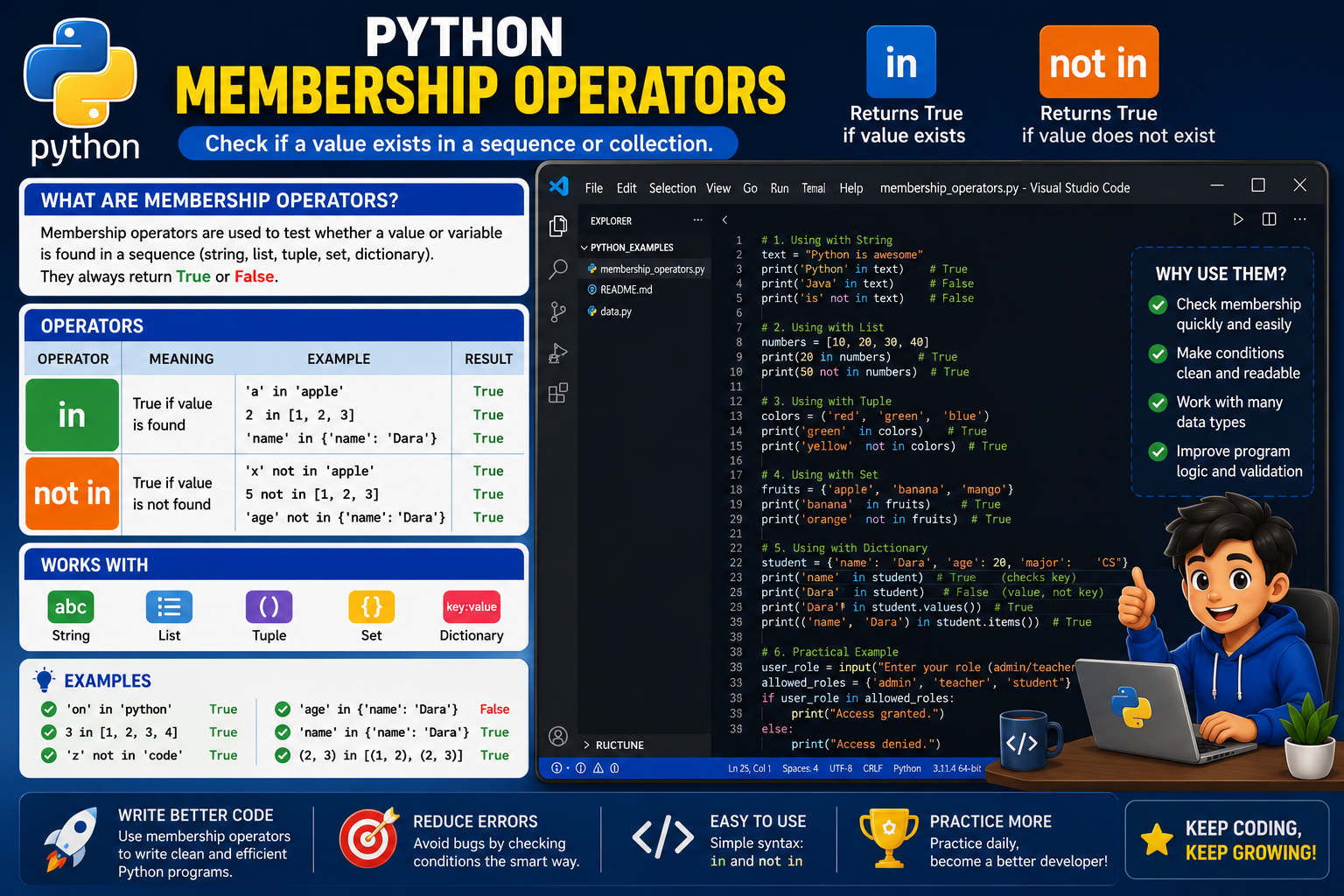
registered_students = [
    "Dara",
    "Sokha",
    "Vanna",
    "Sreyneang"
]
អញ្ញតិ registered_students ជា List ដែលរក្សាទុកឈ្មោះសិស្សដែលបានចុះឈ្មោះ។
available_courses = (
    "Python",
    "Database",
    "Web Development",
    "Networking"
)
អញ្ញតិ available_courses ជា Tuple ដែលរក្សាទុកឈ្មោះវគ្គសិក្សាដែលមាន។
allowed_roles = {
    "admin",
    "teacher",
    "student"
}
អញ្ញតិ allowed_roles ជា Set ដែលរក្សាទុកតួនាទីដែលមានសិទ្ធិប្រើប្រព័ន្ធ។
student_information = {
    "name": "Dara",
    "age": 20,
    "major": "Computer Science"
}
Dictionary នេះរក្សាទុកព័ត៌មានសិស្សជាគូ Key និង Value។
student_name = input("Enter student name: ").strip()
course_name = input("Enter course name: ").strip()
user_role = input("Enter user role: ").strip().lower()
input() ទទួលទិន្នន័យពីអ្នកប្រើ។.strip() ដកចន្លោះទទេនៅខាងដើម និងខាងចុង។.lower() បម្លែងតួនាទីទៅជាអក្សរតូច។student_registered = student_name in registered_studentsពិនិត្យថា ឈ្មោះសិស្សមាននៅក្នុងបញ្ជីដែរឬទេ។
course_available = course_name in available_coursesពិនិត្យថា វគ្គសិក្សាមាននៅក្នុង Tuple ដែរឬទេ។
role_allowed = user_role in allowed_rolesពិនិត្យថា តួនាទីអ្នកប្រើមាននៅក្នុង Set ដែរឬទេ។
has_major_field = "major" in student_information
has_score_field = "score" in student_information
បន្ទាត់ទាំងនេះពិនិត្យថា Key "major" និង "score" មាននៅក្នុង Dictionary ដែរឬទេ។
not inif "score" not in student_information:
print("The score information has not been added.")បន្ទាត់នេះពិនិត្យថា Key "score" មិនមានក្នុង Dictionary។ បើមិនមាន កម្មវិធីបង្ហាញសារថា មិនទាន់បានបញ្ចូលព័ត៌មានពិន្ទុ។
អ្នកប្រើបញ្ចូល៖
Enter student name: Dara
Enter course name: Python
Enter user role: Student
លទ្ធផល៖
=== Membership Results ===
Student registered: True
Course available: True
Role allowed: True
Major field exists: True
Score field exists: False

=== Final Decisions ===
Dara is a registered student.
Python is available.
The user role is allowed.
The score information has not been added.ប្រតិបត្តិករសមាជិកភាពអាចប្រើជាមួយ and, or និង not។
registered_students = ["Dara", "Sokha", "Vanna"]
available_courses = ["Python", "Database"]

student_name = "Dara"
course_name = "Python"

if student_name in registered_students and course_name in available_courses:
    print("The student can enroll in the course.")
else:
    print("Enrollment is not allowed.")
លក្ខខណ្ឌនេះពិត លុះត្រាតែ៖
not in សម្រាប់ការពារទិន្នន័យស្ទួនusernames = ["admin", "dara", "sokha"]
new_username = input("Create a username: ").lower()
if new_username not in usernames:
usernames.append(new_username)
print("Username created successfully.")
else:
print("The username already exists.")កម្មវិធីនេះបន្ថែមឈ្មោះអ្នកប្រើថ្មី លុះត្រាតែឈ្មោះនោះមិនទាន់មានក្នុងបញ្ជី។
in និង ==name == studentsកូដនេះប្រៀបធៀបតម្លៃ name ជាមួយ List ទាំងមូល។
កូដត្រឹមត្រូវ៖
name in studentsកូដនេះពិនិត្យថា name មាននៅក្នុង List ដែរឬទេ។
students = ["Dara", "Sokha"]

print("dara" in students)
លទ្ធផល៖
Falseដោយសារ "dara" និង "Dara" ខុសគ្នា។
អាចដោះស្រាយដោយ៖
students = ["dara", "sokha"]
name = input("Enter name: ").lower()

print(name in students)student = {"name": "Dara"}
print("Dara" in student)លទ្ធផល៖
Falseដោយសារ Python ពិនិត្យ Key។
កូដត្រឹមត្រូវសម្រាប់ Value៖
print("Dara" in student.values())in ជាមួយតម្លៃដែលមិនអាចស្វែងរកបានnumber = 100
print(1 in number)កូដនេះបង្កើតកំហុស ព្រោះចំនួនគត់មិនមែនជាបណ្ដុំទិន្នន័យដែលអាចស្វែងរកសមាជិកបាន។
បង្កើត List ផ្លែឈើ ហើយទទួលឈ្មោះផ្លែឈើពីអ្នកប្រើ។ បង្ហាញថា ផ្លែឈើនោះមាន ឬមិនមានក្នុងបញ្ជី។
បង្កើត Tuple ដែលមាន "Saturday" និង "Sunday"។ ទទួលឈ្មោះថ្ងៃ ហើយពិនិត្យថា ជាថ្ងៃឈប់សម្រាកដែរឬទេ។
បង្កើត Set ដែលមានតួនាទី admin, teacher និង student។ ទទួលតួនាទីពីអ្នកប្រើ ហើយពិនិត្យសិទ្ធិចូលប្រព័ន្ធ។
បង្កើត Dictionary ព័ត៌មានសិស្ស ហើយពិនិត្យថា Key "email" មាននៅក្នុង Dictionary ដែរឬទេ។
បង្កើតបញ្ជីឈ្មោះអ្នកប្រើ ហើយទទួលឈ្មោះថ្មី។ ប្រើ not in ដើម្បីអនុញ្ញាតឱ្យបន្ថែមតែឈ្មោះដែលមិនទាន់មាន។
in ផ្ដល់លទ្ធផល True នៅពេលណា?not in ផ្ដល់លទ្ធផល True នៅពេលណា?"a" in "Cambodia" ផ្ដល់លទ្ធផលអ្វី?in ពិនិត្យអ្វី នៅពេលប្រើជាមួយ Dictionary?"Python" in ["Python", "Java"] ផ្ដល់លទ្ធផលអ្វី?.lower() មានប្រយោជន៍អ្វីក្នុងការពិនិត្យសមាជិកភាព?ប្រតិបត្តិករសមាជិកភាពក្នុង Python រួមមាន in និង not in ដែលប្រើសម្រាប់ពិនិត្យថា តម្លៃ ធាតុ ឬពាក្យណាមួយមាន ឬមិនមាននៅក្នុងខ្សែអក្សរ List, Tuple, Set ឬ Dictionary។ in ផ្ដល់លទ្ធផល True នៅពេលរកឃើញតម្លៃក្នុងបណ្ដុំ ខណៈ not in ផ្ដល់លទ្ធផល True នៅពេលតម្លៃនោះមិនមាន។ នៅពេលប្រើជាមួយ Dictionary ប្រតិបត្តិករទាំងនេះពិនិត្យលើ Key ជាមូលដ្ឋាន ហើយត្រូវប្រើ .values() ប្រសិនបើចង់ពិនិត្យតម្លៃ។ ប្រតិបត្តិករសមាជិកភាពត្រូវបានប្រើជាញឹកញាប់ជាមួយ if, else, and, or និង not ដើម្បីពិនិត្យបញ្ជីឈ្មោះ សិទ្ធិអ្នកប្រើ វគ្គសិក្សា ទិន្នន័យស្ទួន និងព័ត៌មានផ្សេងៗក្នុងកម្មវិធី។





មតិយោបល់ 0