 លំហសិក្សាកម្ពុជា
V1.0
លំហសិក្សាកម្ពុជា
V1.0
លំហសិក្សាកម្ពុជា
V1.0
លំហសិក្សាកម្ពុជា
V1.0
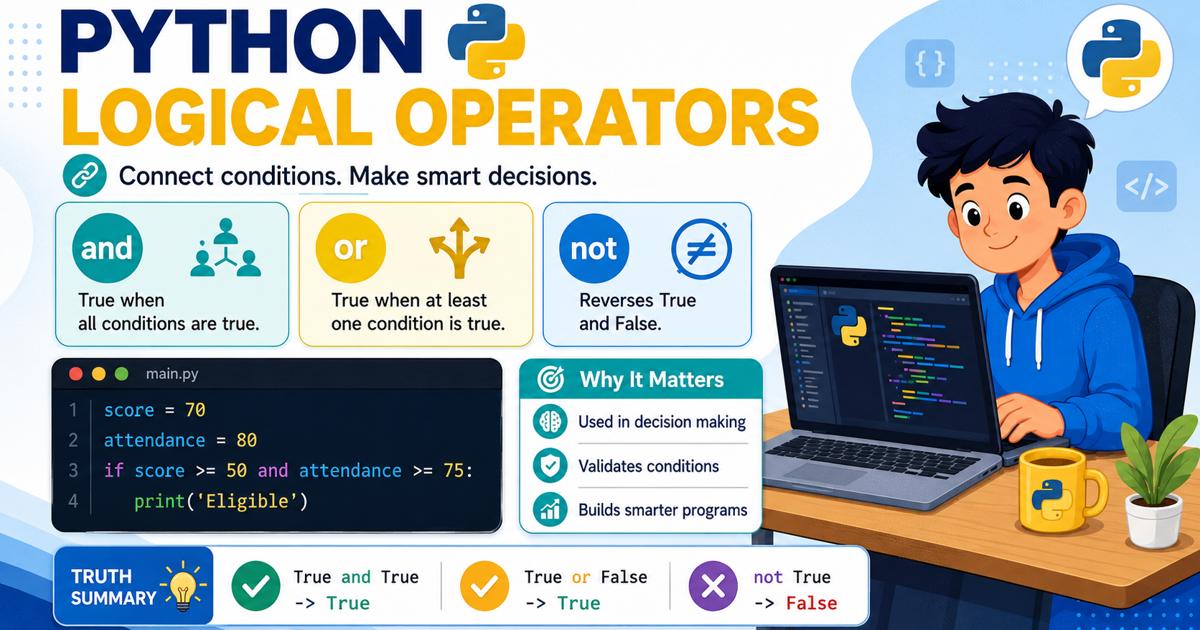


ប្រតិបត្តិករតក្កវិទ្យា (Logical Operators) ក្នុង Python រួមមាន and, or និង not ដែលប្រើសម្រាប់ភ្ជាប់ ឬបញ្ច្រាសលក្ខខណ្ឌ ដើម្បីឱ្យកម្មវិធីអាចសម្រេចចិត្តបានត្រឹមត្រូវ។ and ផ្ដល់លទ្ធផល True នៅពេលលក្ខខណ្ឌទាំងអស់ពិត or ផ្ដល់លទ្ធផល True នៅពេលយ៉ាងហោចណាស់មានលក្ខខណ្ឌមួយពិត ហើយ not ប្រើសម្រាប់បញ្ច្រាសតម្លៃពី True ទៅ False ឬពី False ទៅ True។ ប្រតិបត្តិករទាំងនេះត្រូវបានប្រើជាញឹកញាប់ជាមួយ if, elif, else និងប្រតិបត្តិករប្រៀបធៀប ដើម្បីពិនិត្យសិទ្ធិ ពិន្ទុ អាយុ ពាក្យសម្ងាត់ និងលក្ខខណ្ឌផ្សេងៗក្នុងកម្មវិធី។
ក្នុងការសរសេរកម្មវិធី ពេលខ្លះយើងត្រូវពិនិត្យលក្ខខណ្ឌច្រើនជាងមួយក្នុងពេលតែមួយ។ ឧទាហរណ៍ កម្មវិធីអាចអនុញ្ញាតឱ្យសិស្សប្រឡងជាប់ លុះត្រាតែពិន្ទុរបស់គាត់ចាប់ពី ៥០ ឡើងទៅ និង មានវត្តមានចាប់ពី ៧៥ ភាគរយឡើងទៅ។ កម្មវិធីក៏អាចផ្ដល់ការបញ្ចុះតម្លៃ ប្រសិនបើអតិថិជនជាសមាជិក ឬ ទិញទំនិញលើសពីចំនួនដែលបានកំណត់។
Python ប្រើ ប្រតិបត្តិករតក្កវិទ្យា (Logical Operators) ដើម្បីភ្ជាប់ បញ្ច្រាស ឬវាយតម្លៃលក្ខខណ្ឌច្រើន។ ប្រតិបត្តិករតក្កវិទ្យាសំខាន់ៗមាន and, or និង not។
ប្រតិបត្តិករតក្កវិទ្យា គឺជាពាក្យគន្លឹះដែលប្រើសម្រាប់ភ្ជាប់ ឬបញ្ច្រាសលក្ខខណ្ឌ ដើម្បីបង្កើតលក្ខខណ្ឌដែលមានភាពស្មុគស្មាញជាងមុន។
លទ្ធផលនៃកន្សោមតក្កវិទ្យាជាទូទៅគឺ៖
True មានន័យថា លក្ខខណ្ឌពិត។False មានន័យថា លក្ខខណ្ឌមិនពិត។ឧទាហរណ៍៖
age = 20
has_id = True

print(age >= 18 and has_id)
ក្នុងកូដនេះ៖
age >= 18 មានលទ្ធផលជា Truehas_id មានតម្លៃ Trueand តម្រូវឱ្យលក្ខខណ្ឌទាំងពីរពិតដូច្នេះ លទ្ធផលគឺ៖
True| ប្រតិបត្តិករ | អត្ថន័យ | លទ្ធផល True នៅពេល |
|---|---|---|
and | និង | លក្ខខណ្ឌទាំងអស់ពិត |
or | ឬ | យ៉ាងហោចណាស់មានលក្ខខណ្ឌមួយពិត |
not | មិនមែន ឬបញ្ច្រាស | បញ្ច្រាស True ទៅ False និង False ទៅ True |
andប្រតិបត្តិករ and ប្រើសម្រាប់ភ្ជាប់លក្ខខណ្ឌពីរ ឬច្រើន។ លទ្ធផលរបស់វាជា True លុះត្រាតែលក្ខខណ្ឌទាំងអស់ពិត។
ឧទាហរណ៍៖
score = 80
attendance = 90

result = score >= 50 and attendance >= 75

print(result)
ការពិនិត្យ៖
score >= 50       → True
attendance >= 75 → True
ដោយសារលក្ខខណ្ឌទាំងពីរពិត លទ្ធផលគឺ៖
Trueand| លក្ខខណ្ឌទី១ | លក្ខខណ្ឌទី២ | លទ្ធផល |
True | True | True |
True | False | False |
False | True | False |
False | False | False |
ប្រតិបត្តិករ and អាចយល់សាមញ្ញថា៖
គ្រប់លក្ខខណ្ឌត្រូវតែពិត ទើបលទ្ធផលពិត។
correct_username = True
correct_password = True

if correct_username and correct_password:
    print("Login successful.")
else:
    print("Login failed.")
កម្មវិធីអនុញ្ញាតឱ្យចូលប្រព័ន្ធ លុះត្រាតែឈ្មោះអ្នកប្រើ និងពាក្យសម្ងាត់ត្រឹមត្រូវទាំងពីរ។
number = 50

if number >= 1 and number <= 100:
    print("The number is between 1 and 100.")
else:
    print("The number is outside the range.")
លក្ខខណ្ឌនេះពិនិត្យថា លេខស្ថិតនៅចន្លោះពី 1 ដល់ 100។
Python អនុញ្ញាតឱ្យសរសេរខ្លីជាងនេះ៖
if 1 <= number <= 100:
print("The number is between 1 and 100.")orប្រតិបត្តិករ or ប្រើសម្រាប់ភ្ជាប់លក្ខខណ្ឌពីរ ឬច្រើន។ លទ្ធផលរបស់វាជា True ប្រសិនបើយ៉ាងហោចណាស់មានលក្ខខណ្ឌមួយពិត។
ឧទាហរណ៍៖
is_member = False
purchase_amount = 150

result = is_member or purchase_amount >= 100

print(result)
ការពិនិត្យ៖
is_member             → False
purchase_amount >= 100 → True
ដោយសារមានលក្ខខណ្ឌមួយពិត លទ្ធផលគឺ៖
Trueor| លក្ខខណ្ឌទី១ | លក្ខខណ្ឌទី២ | លទ្ធផល |
True | True | True |
True | False | True |
False | True | True |
False | False | False |
ប្រតិបត្តិករ or អាចយល់សាមញ្ញថា៖
មានតែលក្ខខណ្ឌមួយពិត ក៏លទ្ធផលអាចពិតបាន។
day = "Sunday"

if day == "Saturday" or day == "Sunday":
    print("It is a weekend.")
else:
    print("It is a working day.")
កម្មវិធីបង្ហាញថាជាថ្ងៃឈប់សម្រាក ប្រសិនបើថ្ងៃនោះជាថ្ងៃសៅរ៍ ឬថ្ងៃអាទិត្យ។
is_member = False
total_purchase = 120

if is_member or total_purchase >= 100:
    print("You receive a discount.")
else:
    print("No discount.")
អតិថិជនទទួលបានការបញ្ចុះតម្លៃ ប្រសិនបើ៖
notប្រតិបត្តិករ not ប្រើសម្រាប់បញ្ច្រាសតម្លៃតក្កវិទ្យា។
not True ផ្ដល់លទ្ធផល Falsenot False ផ្ដល់លទ្ធផល Trueឧទាហរណ៍៖
is_raining = False

print(not is_raining)
ដោយសារ is_raining មានតម្លៃ False ការប្រើ not បញ្ច្រាសវាទៅជា៖
Truenot| លក្ខខណ្ឌដើម | លទ្ធផលក្រោយប្រើ not |
True | False |
False | True |
account_locked = False

if not account_locked:
    print("You can access the account.")
else:
    print("The account is locked.")
not account_locked មានន័យថា គណនីមិនត្រូវបានចាក់សោ។
name = ""

if not name:
    print("Name is required.")
else:
    print("Welcome,", name)
ខ្សែអក្សរទទេ "" ត្រូវបានចាត់ទុកថា False។ ដូច្នេះ not name ផ្ដល់លទ្ធផល True ហើយកម្មវិធីបង្ហាញថា ត្រូវបញ្ចូលឈ្មោះ។
យើងអាចប្រើ and, or និង not រួមគ្នាក្នុងលក្ខខណ្ឌតែមួយ។
ឧទាហរណ៍៖
age = 25
has_ticket = True
is_banned = False

if age >= 18 and has_ticket and not is_banned:
    print("Entry allowed.")
else:
    print("Entry denied.")
ការចូលត្រូវបានអនុញ្ញាត លុះត្រាតែ៖
នៅពេលមានប្រតិបត្តិករតក្កវិទ្យាច្រើន Python អនុវត្តតាមលំដាប់៖
notandorឧទាហរណ៍៖
result = True or False and False

print(result)
Python គណនា and មុន៖
False and False → False
True or False   → True
លទ្ធផល៖
Trueដើម្បីឱ្យកូដងាយយល់ គួរប្រើវង់ក្រចក៖
result = True or (False and False)ឬ៖
result = (True or False) and Falseកន្សោមទាំងពីរនេះអាចផ្ដល់លទ្ធផលខុសគ្នា ព្រោះវង់ក្រចកប្ដូរលំដាប់នៃការវាយតម្លៃ។
កម្មវិធីខាងក្រោមពិនិត្យសិទ្ធិរបស់សិស្សក្នុងការប្រឡង ដោយផ្អែកលើពិន្ទុ វត្តមាន និងស្ថានភាពវិន័យ។
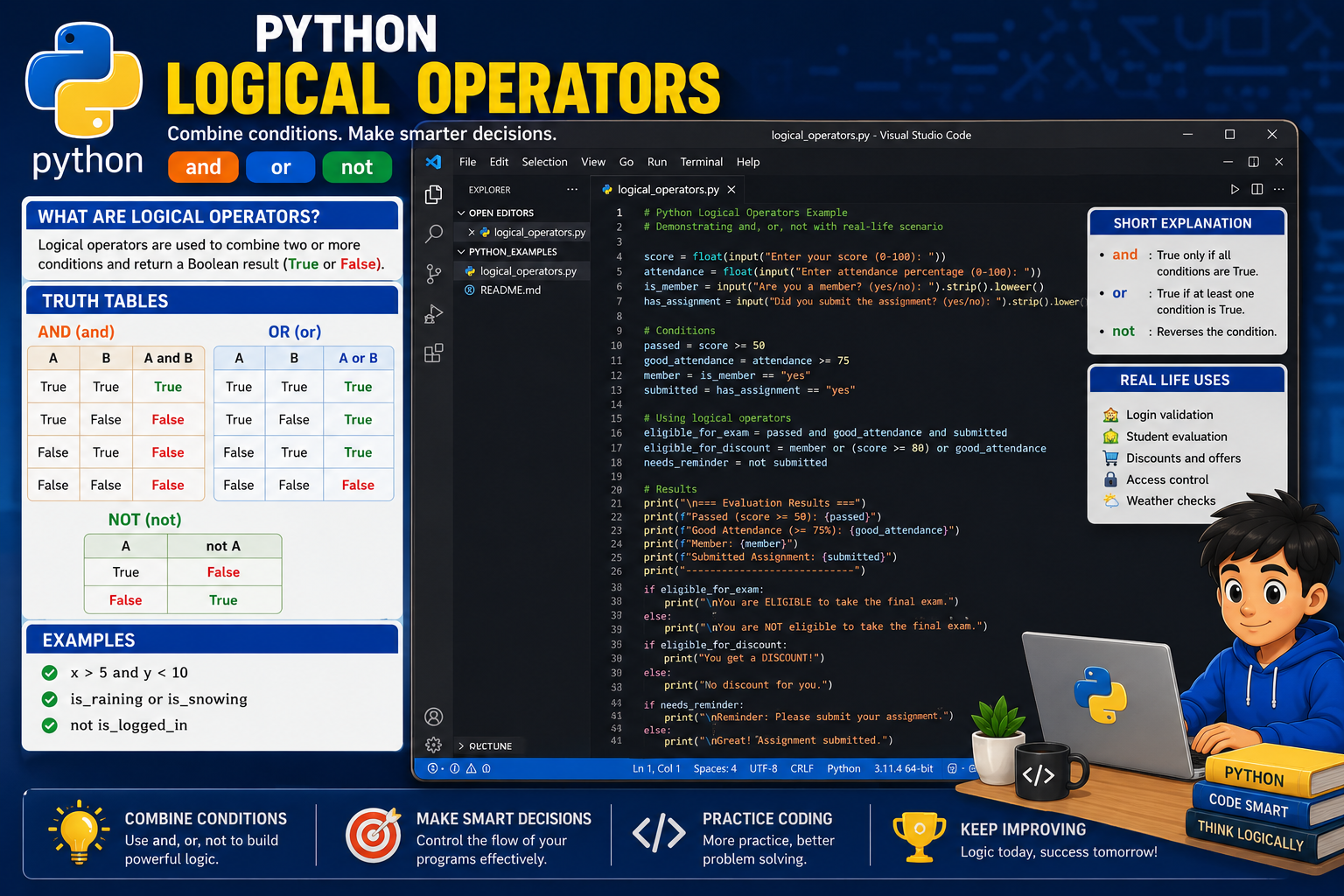
# Python Logical Operators Exercise

score = float(input("Enter your score: "))
attendance = float(input("Enter attendance percentage: "))
is_suspended = input("Are you suspended? (yes/no): ").lower()

passed_score = score >= 50
good_attendance = attendance >= 75
not_suspended = is_suspended != "yes"

print("\n=== Condition Results ===")
print("Passed score:", passed_score)
print("Good attendance:", good_attendance)
print("Not suspended:", not_suspended)

eligible = passed_score and good_attendance and not_suspended

print("\n=== Final Result ===")

if eligible:
    print("You are eligible to take the final examination.")
else:
    print("You are not eligible to take the final examination.")

print("\n=== Additional Information ===")

if passed_score or good_attendance:
    print("At least one academic condition is satisfied.")
else:
    print("No academic condition is satisfied.")

if not passed_score:
    print("You need to improve your score.")

if not good_attendance:
    print("You need to improve your attendance.")

if not not_suspended:
print("Your suspension must be resolved.")# Python Logical Operators Exerciseបន្ទាត់នេះជាមតិយោបល់ដែលពន្យល់ថា កម្មវិធីនេះជាលំហាត់អំពីប្រតិបត្តិករតក្កវិទ្យា។
score = float(input("Enter your score: "))បន្ទាត់នេះ៖
input() ដើម្បីទទួលពិន្ទុពីអ្នកប្រើ។float() ដើម្បីបម្លែងទិន្នន័យទៅជាចំនួនទសភាគ។score។attendance = float(input("Enter attendance percentage: "))បន្ទាត់នេះទទួលភាគរយវត្តមាន ហើយរក្សាទុកក្នុងអញ្ញតិ attendance។
is_suspended = input("Are you suspended? (yes/no): ").lower()បន្ទាត់នេះទទួលចម្លើយ "yes" ឬ "no" ពីអ្នកប្រើ។ មុខងារ .lower() បម្លែងអក្សរទាំងអស់ទៅជាអក្សរតូច ដើម្បីងាយស្រួលប្រៀបធៀប។
passed_score = score >= 50លក្ខខណ្ឌនេះពិនិត្យថា ពិន្ទុចាប់ពី ៥០ ឡើងទៅដែរឬទេ។ លទ្ធផល True ឬ False ត្រូវបានរក្សាទុកក្នុងអញ្ញតិ passed_score។
good_attendance = attendance >= 75លក្ខខណ្ឌនេះពិនិត្យថា វត្តមានចាប់ពី ៧៥ ភាគរយឡើងទៅដែរឬទេ។
not_suspended = is_suspended != "yes"បន្ទាត់នេះពិនិត្យថា ចម្លើយមិនស្មើនឹង "yes"។ ប្រសិនបើអ្នកប្រើបញ្ចូល "no" អញ្ញតិ not_suspended នឹងមានតម្លៃ True។
print("\n=== Condition Results ===")
print("Passed score:", passed_score)
print("Good attendance:", good_attendance)
print("Not suspended:", not_suspended)
បន្ទាត់ទាំងនេះបង្ហាញលទ្ធផល True ឬ False នៃលក្ខខណ្ឌនីមួយៗ។
andeligible = passed_score and good_attendance and not_suspendedអញ្ញតិ eligible មានតម្លៃ True លុះត្រាតែ៖
passed_score ជា Truegood_attendance ជា Truenot_suspended ជា Trueប្រសិនបើលក្ខខណ្ឌណាមួយមិនពិត លទ្ធផលទាំងមូលនឹងជា False។
if eligible:
    print("You are eligible to take the final examination.")
else:
    print("You are not eligible to take the final examination.")
បើ eligible ពិត សិស្សមានសិទ្ធិប្រឡង។ បើមិនពិត សិស្សមិនមានសិទ្ធិប្រឡង។
orif passed_score or good_attendance:
print("At least one academic condition is satisfied.")
else:
print("No academic condition is satisfied.")លក្ខខណ្ឌនេះពិត ប្រសិនបើសិស្សមានពិន្ទុជាប់ ឬមានវត្តមានល្អ យ៉ាងហោចណាស់មួយ។
notif not passed_score:
print("You need to improve your score.")not passed_score ពិតនៅពេល passed_score ជា False។
if not good_attendance:
    print("You need to improve your attendance.")
បន្ទាត់នេះបង្ហាញសារ ប្រសិនបើវត្តមានមិនគ្រប់គ្រាន់។
អ្នកប្រើបញ្ចូល៖
Enter your score: 70
Enter attendance percentage: 85
Are you suspended? (yes/no): no
លទ្ធផល៖
=== Condition Results ===
Passed score: True
Good attendance: True
Not suspended: True

=== Final Result ===
You are eligible to take the final examination.

=== Additional Information ===
At least one academic condition is satisfied.
បើអ្នកប្រើបញ្ចូល៖
Enter your score: 45
Enter attendance percentage: 80
Are you suspended? (yes/no): no
លទ្ធផល៖
Passed score: False
Good attendance: True
Not suspended: True

You are not eligible to take the final examination.
At least one academic condition is satisfied.
You need to improve your score.Python មិនចាំបាច់វាយតម្លៃគ្រប់លក្ខខណ្ឌជានិច្ចទេ។ វាអាចឈប់ពិនិត្យភ្លាមៗ នៅពេលដឹងលទ្ធផលចុងក្រោយ។ នេះហៅថា Short-Circuit Evaluation។
andx = 0
result = x != 0 and 10 / x > 2
print(result)ដោយសារ x != 0 ជា False Python មិនបន្តគណនា 10 / x ទេ។ ដូច្នេះ កម្មវិធីមិនបង្កើតកំហុសចែកនឹងសូន្យ។
oris_admin = True
has_permission = False
result = is_admin or has_permissionដោយសារ is_admin ជា True Python អាចដឹងភ្លាមថា លទ្ធផលរបស់ or ជា True ដោយមិនចាំបាច់ពិនិត្យលក្ខខណ្ឌបន្ទាប់។
&& ជំនួស andកូដមិនត្រឹមត្រូវ៖
if age >= 18 && has_id:
    print("Allowed")
កូដត្រឹមត្រូវ៖
if age >= 18 and has_id:
    print("Allowed")
Python ប្រើពាក្យ and មិនប្រើ && ទេ។
|| ជំនួស orកូដមិនត្រឹមត្រូវ៖
if day == "Saturday" || day == "Sunday":
    print("Weekend")
កូដត្រឹមត្រូវ៖
if day == "Saturday" or day == "Sunday":
print("Weekend")! ជំនួស notកូដមិនត្រឹមត្រូវ៖
if !is_locked:
    print("Access allowed")
កូដត្រឹមត្រូវ៖
if not is_locked:
print("Access allowed")or មិនពេញលេញកូដមិនត្រឹមត្រូវ៖
if day == "Saturday" or "Sunday":
    print("Weekend")
កន្សោមនេះតែងតែអាចផ្ដល់លទ្ធផលពិត ព្រោះ "Sunday" ជាខ្សែអក្សរមិនទទេ។
កូដត្រឹមត្រូវ៖
if day == "Saturday" or day == "Sunday":
    print("Weekend")
ឬ៖
if day in ("Saturday", "Sunday"):
print("Weekend")ទទួលអាយុ និងសញ្ជាតិពីអ្នកប្រើ។ អ្នកប្រើមានសិទ្ធិបោះឆ្នោត ប្រសិនបើ៖
អតិថិជនទទួលបានការបញ្ចុះតម្លៃ ប្រសិនបើ៖
ទទួលលេខមួយ ហើយពិនិត្យថា លេខនោះស្ថិតក្នុងចន្លោះពី 10 ដល់ 50 ដោយប្រើ and។
អ្នកប្រើអាចចូលប្រព័ន្ធ ប្រសិនបើ៖
ទទួលឈ្មោះថ្ងៃពីអ្នកប្រើ ហើយប្រើ or ដើម្បីពិនិត្យថា ថ្ងៃនោះជាថ្ងៃសៅរ៍ ឬអាទិត្យ។
and ផ្ដល់លទ្ធផល True នៅពេលណា?or ផ្ដល់លទ្ធផល False នៅពេលណា?not មានតួនាទីអ្វី?True and False ផ្ដល់លទ្ធផលអ្វី?True or False ផ្ដល់លទ្ធផលអ្វី?not True ផ្ដល់លទ្ធផលអ្វី?not, and និង or មានលំដាប់អាទិភាពដូចម្ដេច?ប្រតិបត្តិករតក្កវិទ្យាក្នុង Python ប្រើសម្រាប់ភ្ជាប់ និងបញ្ច្រាសលក្ខខណ្ឌ ដើម្បីឱ្យកម្មវិធីអាចធ្វើការសម្រេចចិត្តបានកាន់តែស្មុគស្មាញ។ ប្រតិបត្តិករ and ផ្ដល់លទ្ធផល True នៅពេលលក្ខខណ្ឌទាំងអស់ពិត or ផ្ដល់លទ្ធផល True នៅពេលយ៉ាងហោចណាស់មានលក្ខខណ្ឌមួយពិត ហើយ not ប្រើសម្រាប់បញ្ច្រាសតម្លៃពី True ទៅ False ឬពី False ទៅ True។ ប្រតិបត្តិករទាំងនេះត្រូវបានប្រើជាញឹកញាប់ជាមួយប្រតិបត្តិករប្រៀបធៀប និងសេចក្ដីបញ្ជា if, elif, else ដើម្បីពិនិត្យសិទ្ធិចូលប្រព័ន្ធ ពិន្ទុ វត្តមាន អាយុ ពាក្យសម្ងាត់ និងលក្ខខណ្ឌជាក់ស្ដែងផ្សេងៗ។





មតិយោបល់ 0