លំហសិក្សាកម្ពុជា លំហសិក្សាកម្ពុជា V1.0
ចូល ចុះឈ្មោះ

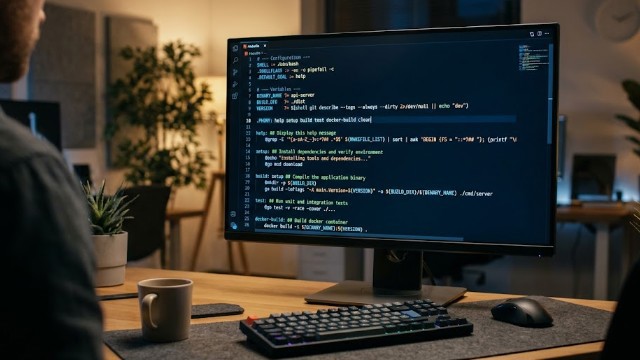
"Makefile" automation command-line tools

មូលសង្ខេប / Abstract

A Makefile is often treated as a relic of legacy C/C++ projects—a cryptic, indentation-sensitive script that developers avoid modifying unless absolutely necessary. In modern software engineering, however, GNU Make remains one of the most lightweight, omnipresent, and versatile workflow automation tools available. Whether orchestrating a Go backend, a Python machine learning pipeline, Docker containers, or Kubernetes deployments, an effectively designed Makefile standardizes developer commands, speeds up CI/CD workflows, and eliminates repetitive documentation.

ពាក្យគន្លឹះ

1. Always Declare Non-File Targets as .PHONY

When using Make as a task runner (e.g., make test, make build, make clean), targets do not produce files matching their names. If someone creates a directory named test in your repository root, running make test will output make: 'test' is up to date and do nothing.

Declare all command targets explicitly:

  • .PHONY: all build test lint clean help

2. Set Sensible Defensive Defaults

By default, Make runs commands using /bin/sh with loose error handling. At the very top of your Makefile, include sensible flags:

  • SHELL := bash
  • .SHELLFLAGS := -eu -o pipefail -c
  • .DEFAULT_GOAL := help
  • .DELETE_ON_ERROR:
  • MAKEFLAGS += --warn-undefined-variables
  • MAKEFLAGS += --no-builtin-rules
  • -eu -o pipefail: Forces bash to fail fast if any sub-command fails or uses an uninitialized variable.

  • .DELETE_ON_ERROR: Automatically deletes a target file if the recipe generating it fails mid-execution, preventing corrupt builds on subsequent runs.

  • .DEFAULT_GOAL := help: Prevents running the first target accidentally when a developer simply types ma

3. Build Self-Documenting Makefiles

Instead of maintaining an outdated README.md list of commands, parse comments directly into a readable command palette:

  • .PHONY: help
  • help: ## Display available commands
  • @grep -E '^[a-zA-Z_-]+:.*?## .*$$' $(MAKEFILE_LIST) | \
  • awk 'BEGIN {FS = ":.*?## "}; {printf "\033[36m%-18s\033[0m %s\n", $$1, $$2}'

  • build: ## Build the production binary
  • @go build -o bin/app ./cmd/app

  • test: ## Run unit and integration tests
  • @go test -v -race ./...
Typing make or make help now produces clean, colored output:

  • build Build the production binary 
  • test Run unit and integration tests

4. Leverage Automatic Variables and Substitution

Avoid repeating file names across prerequisites and recipes by taking advantage of Make's built-in automatic variables:

  • $@: The target filename.

  • $<: The first prerequisite.

  • $^: All prerequisites listed, with duplicates removed.

  • $?: All prerequisites newer than the target.

  • bin/server: cmd/main.go pkg/api.go @mkdir -p $(@D) go build -o $@ $<
(Here, $(@D) extracts the directory component bin, ensuring the folder exists before compiling).

5. Handle Variables and Environment Overrides

Makefiles should be configurable across different machines and CI environments. Use ?= for variables so they can be overridden via environment variables or CLI flags:

  • ENVIRONMENT ?= development PORT ?= 8080 
  • run: ## Start local server @echo "Starting in $(ENVIRONMENT) mode on port $(PORT)..." PORT=$(PORT) ./bin/server
Users can run make run or override settings on the fly:

  • make run ENVIRONMENT=staging PORT=3000

Real World Example: Multi-Service Workflow

Here is how a clean, cross-language project Makefile looks in practice:

  • SHELL := bash

    • .SHELLFLAGS := -eu -o pipefail -c
    • .DEFAULT_GOAL := help
    • .DELETE_ON_ERROR:

    • DOCKER_IMAGE ?= my-app:latest

    • .PHONY: all help setup lint test build docker-build clean

    • help: ## Show this help message
    • @grep -E '^[a-zA-Z_-]+:.*?## .*$$' $(MAKEFILE_LIST) | \
    • awk 'BEGIN {FS = ":.*?## "}; {printf "\033[34m%-15s\033[0m %s\n", $$1, $$2}'

    • setup: ## Install dependencies and dev tools
    • @command -v docker >/dev/null 2>&1 || { echo "Docker is required"; exit 1; }
    • npm ci

    • lint: ## Run code linters
    • npm run lint

    • test: lint ## Run unit tests (runs lint first)
    • npm test -- --coverage

    • build: ## Compile production assets
    • npm run build

    • docker-build: build ## Build production Docker container
    • docker build -t $(DOCKER_IMAGE) .

    • clean: ## Remove temporary build files
    • rm -rf dist/ coverage/ node_modules/

    ចែករំលែក
    រក្សាទុក
    ការផ្សព្វផ្សាយ
    ការផ្សព្វផ្សាយ
    មតិយោបល់ 0
    ចូលគណនី ដើម្បីបញ្ចេញមតិ